
August
What's New | August 7, 2026
A look at what's new across the BroadJump and Curvo platforms this release cycle, organized by who it affects.
Quick links:
For BroadJump Platform Users
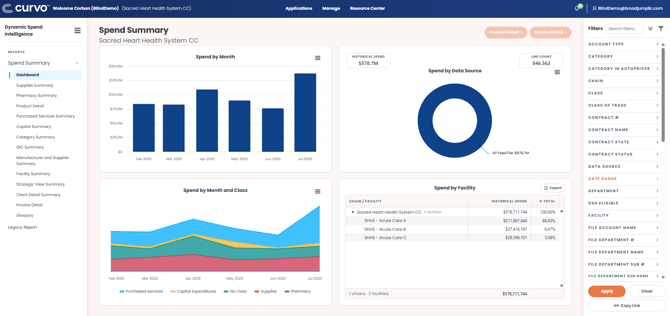
Enhanced Spend Summary Report
We are excited to introduce the new Spend Summary experience – the same aggregate, enriched data in an upgraded environment. The new Spend Summary report boasts improved performance, including for high-cardinality filters, with similar visuals and functionality to which you’re accustomed.
Navigate to the new Spend Summary report via initiatives or the left-hand navigation menu in Dynamic Spend Intelligence.
Introducing Proposal Initiatives (and other Proposal Enhancements)
Proposal Initiatives
There is a new workflow for analyzing proposals within Initiatives (formerly Playbook), that allows users to upload a proposal directly as an initiative and later track savings for the same list of products.
- Click the ‘Create Initiative’ option within Initiatives and select ‘Proposal Analysis’.
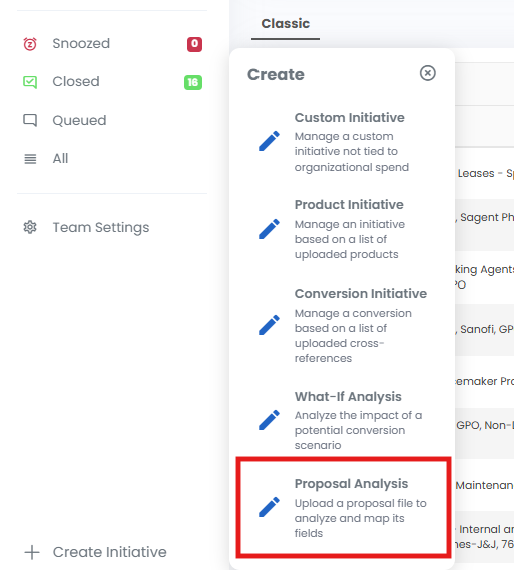
- Name your initiative, upload a proposal file, and enter other relevant details.
- Map the file fields to begin processing.
- Within 24 hours, easily link to proposal results from within the initiative, quantifying the impact of the proposal to your organization and comparing it to the larger market.
- Close the initiative to enable automated savings tracking for the proposal products in InitiativeTracker.
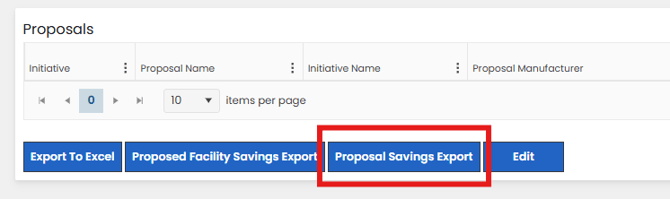
Proposal Export
A new export from the proposal dashboard allows users to download all proposal lines, including any unrecognized lines, with enriched product data, pricing benchmarks, and client specific data fields (like historical usage, contract information, and MMIS number).
New and Improved Knowledge Base
Navigating to Release Notes (Resource Center > Release Notes) will now link you to a new and improved Knowledge Base.
For Curvo Platform Users
Introducing Proposals (via Initiatives)
Users of Initiatives will now have the ability to generate a Proposal analysis, enabling evaluation of supplier proposals in comparison to current pricing and/or the larger market.
- Upload ad-hoc vendor proposals or price lists for competitive analysis
- AI-driven recognition of price list files for normalization and comparative analytics
- Quantify proposal savings compared to a group’s historical pricing
- Compare pricing to the market based on spend and market share qualifications
- Automatically generate facility impact analyses of the proposal
- Download proposal results, including enriched product data, pricing benchmarks, client specific data fields (like historical usage, contract information, and MMIS number)
- Dynamically track savings for proposal products upon closing the initiative
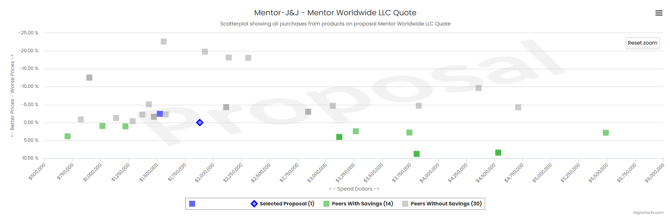
To create a Proposal Analysis:
- Click the ‘Create Initiative’ option within Initiatives and select ‘Proposal Analysis’.
- Name your initiative, upload a proposal file, and enter other relevant details.
- Map the file fields to begin processing.
- Within 24 hours, easily link to proposal results from within the initiative, quantifying the impact of the proposal to your organization and comparing it to the larger market.
- Close the initiative to enable automated savings tracking for the proposal products in InitiativeTracker
Contact your VP Client Management for help accessing Initiatives and Proposals.
For Pharmacy Customers
WAC Spend Comparison Report
The WAC Spend Comparison report is now automated and dynamic within Dynamic Spend Intelligence.
June
✨ Playbook is Now Initiatives
Playbook has been renamed Initiatives.
While the name is changing, the functionality you rely on remains the same. Initiatives continues to help your organization identify, prioritize, track, and execute savings and optimization opportunities— all within the Curvo platform.
With Initiatives, you can:
- Prioritize opportunities based on impact and strategic importance
- Track initiatives from identification through completion
- Measure project-specific savings with automated savings tracking
- Centralize opportunity management to reduce manual effort
- Make more informed, data-driven decisions
These capabilities provide a more streamlined approach to managing savings initiatives and help your team maximize the value of the Curvo platform.
🚀 Coming Soon: Initiatives for Legacy Curvo Platform Users
Legacy Curvo platform users will soon gain access to Initiatives.
This upcoming enhancement brings integrated project management, opportunity prioritization, and automated savings tracking to your existing platform, making it easier to execute and measure high-impact savings initiatives.
If you'd like to learn more about the rollout timeline or discuss how Initiatives can support your organization, please contact your VP of Client Management.
📖 Ready to learn more? Check out the Initiatives User Guide.
March
GIC in Legacy BroadJump Reporting
As part of our ongoing integration of Curvo and BroadJump, we’re excited to begin rolling out Generic Implant Classification (GIC®) within the legacy BroadJump platform.
What is GIC?
GIC is Curvo’s proprietary clinical classification system that groups implants based on their clinical characteristics and use in procedures. It creates a consistent way to compare similar products across manufacturers, something that is often difficult with manufacturer-driven product descriptions alone.
What’s changing
Beginning with a phased release on March 16, GIC clinical categorization will be available within BroadJump reporting. The first release will include GIC classifications across 11 orthopedic categories, including:
- Spine
- Trauma
- Hip
- Knee
- Osteobiologics
- Additional orthopedic segments
Where you’ll see it
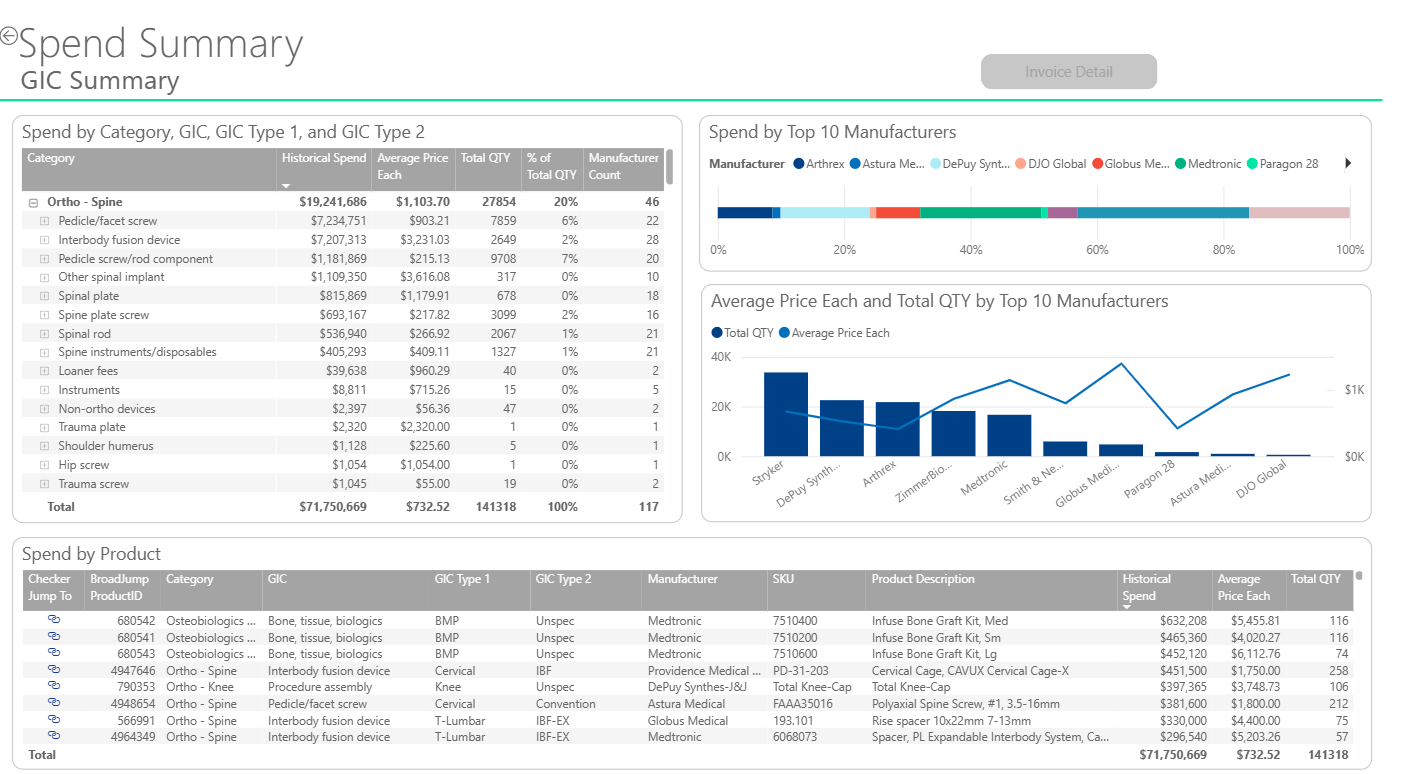
GIC will appear within the Spend Summary report in the BroadJump platform, allowing you to:
- Compare average prices by GIC across manufacturers
- Identify variation across clinically similar products
- Drill down to invoice-level detail for any GIC category
To access the new functionality, go to Dynamic Spend Intelligence and choose the Spend Summary report. You will see a new page called GIC Summary. To view this information for a given GIC, either select the GIC in the GIC visual on the left or select the GIC in the filter in the right filter pane.
Why this matters
Bringing GIC into BroadJump extends Curvo’s clinical intelligence to all clients, helping teams analyze implant spend at a more clinically meaningful level and uncover opportunities that are often hidden in traditional item-level reporting.
What’s next
This release is the first step in expanding shared data capabilities across the Curvo + BroadJump platform. As our catalogs continue to combine:
- Additional product segments will receive GIC categorization
- New GICs will be added to the shared master item catalog
- These enhancements will become available to all Curvo and BroadJump users
February
Market Baskets
Top Parent End Users are now able to assign Custom Baskets to be only visible to Top Parent Users on the account using a toggle in the Contract Details screen.
User Permissions
End Users are able to be assigned a roll of read only access to the Market Basket section, limiting their access to edit Custom Baskets.
When and End User is set with no access to Market Baskets, is in Data Explorer, they will not see any Market Basket options like Analyze and or add to basket.
January
Contracts
In contracts, end users will now see their list of Tiers sorted in Alpha numeric order.
Contract Code has been added as a required field in the Basic Info step of Create/Update Contracts.
In the Products And Pricing step of Create/Update Contracts, the Tier Price, Effective Start, and Effective End Dates display has been updated to ensure that the current price displayed is for the current active date range. If the Price has future active dates, or past active dates, the user can still see the price history by expanding the pricing row for the item.
Also for the Products And Pricing step, the system will now properly update the Effective Start and End dates via the Products And Pricing upload file updates.
In the Manage Members section, updates were made to improve the performance of the page load including the link for Show Global Market Share.